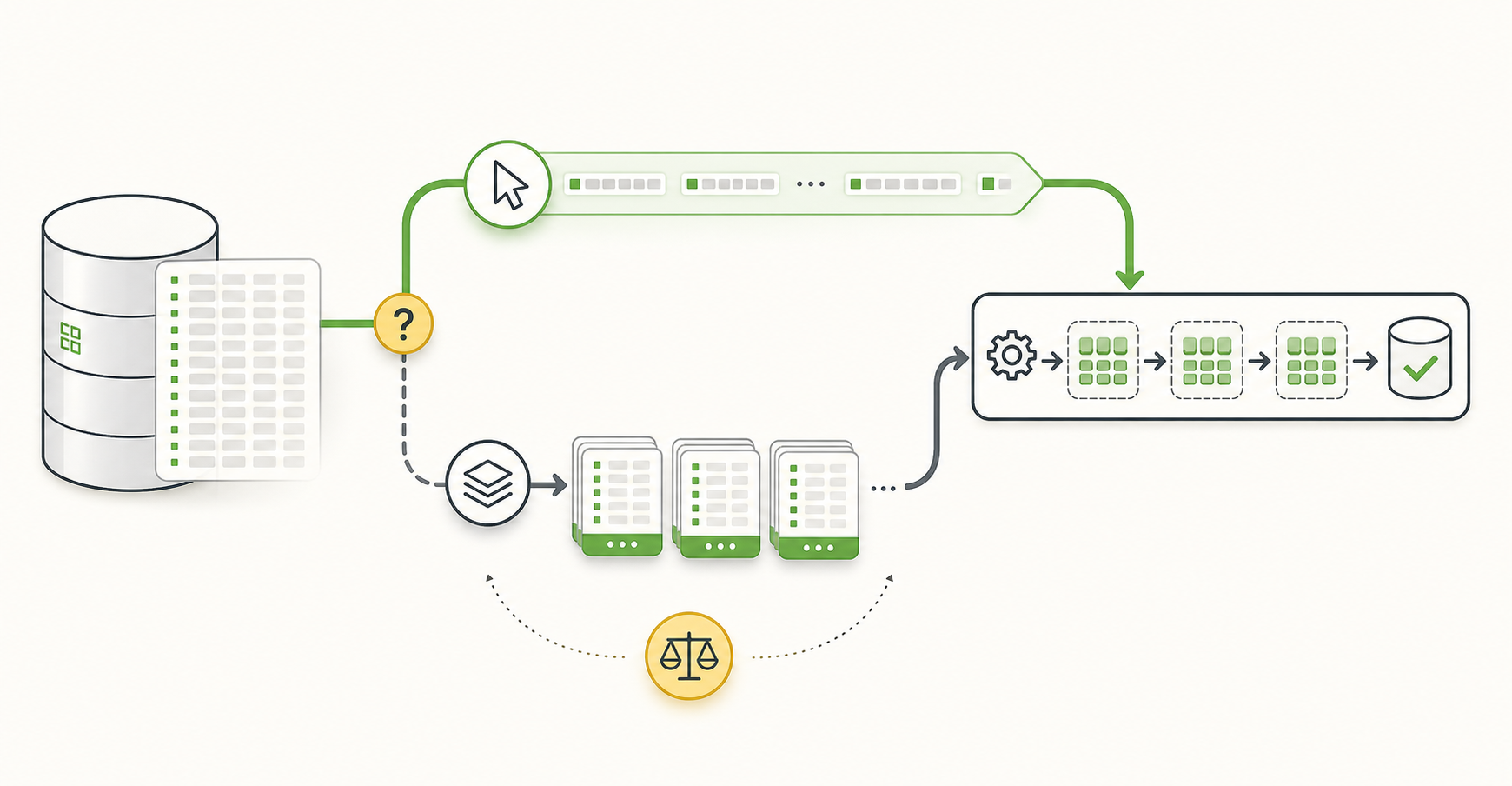
TL;DR
When choosing a Spring Batch Reader, it is tempting to assume that large datasets always call for a Paging Reader.
In practice, which query gets executed repeatedly mattered more than the size of the data alone. A Paging Reader fits a simple scan in stable key order. A Cursor Reader may be a better fit when consuming the result of one expensive aggregate query sequentially.
I ran into this distinction while building a ranking batch. It read a period such as 30 days from product_metric_daily, aggregated with GROUP BY product_id, and built weekly and monthly ranking MVs. With paging, each page could require another scan and aggregation of the same period. I chose JdbcCursorItemReader to open the aggregate query once and consume its result through a cursor.
That comes with costs: a long-held connection, JDBC driver fetch behavior, and timeout settings. The right question is where the bottleneck lies, rather than simply whether the dataset is large.
Why choosing a Reader was harder than expected
A Spring Batch Step looks fairly simple at first.
Reader -> Processor -> Writer
The Reader reads, the Processor transforms, and the Writer stores the results.
But the Reader influences more than I expected: query execution, memory usage, restart behavior, connection duration, and processing speed.
My first thought was to use paging for a large dataset. Reading smaller pages seems safer because it avoids loading everything into memory at once. That is reasonable in many cases, but not every batch query looks like SELECT * FROM table ORDER BY id.
The ranking batch used a query like this:
SELECT
    product_id,
    SUM(view_count) AS view_count,
    SUM(like_count) AS like_count,
    SUM(sales_amount) AS sales_amount
FROM product_metric_daily
WHERE metric_date >= ?
  AND metric_date < ?
GROUP BY product_id
ORDER BY product_id;
It aggregates 30 days of daily metrics per product, calculates scores, and writes a monthly ranking MV.
Before the Reader can consume any rows, the database has to scan the period and produce the GROUP BY result. A paged approach can cause that work to be repeated for each page.
For this task, the number of times the expensive query runs mattered more than the number of rows read per call.
How I evaluate Spring Batch Readers
Even for database input alone, Spring Batch offers JdbcCursorItemReader, JdbcPagingItemReader, JpaPagingItemReader, and RepositoryItemReader.
The reference documentation describes JdbcCursorItemReader as reading a JDBC ResultSet sequentially through a cursor, while JdbcPagingItemReader uses a PagingQueryProvider to generate page queries.
Understanding the behavior matters more than remembering the names. These are the questions I now ask first:
- Is the source query a simple read or an aggregate query?
- Is there a stable sort key?
- Is repeated execution of the query affordable?
- Can the batch hold a database connection for a long time?
- How important is managing a restart position after failure?
- Do we need a JPA persistence context, or is JDBC row mapping enough?
Cursor Reader
A Cursor Reader opens a query and reads its results sequentially through a cursor. For JDBC, that means using JdbcCursorItemReader.
@Bean
@StepScope
fun rankingAggregateReader(
    dataSource: DataSource,
    @Value("#{jobParameters['baseDate']}") baseDate: String,
): JdbcCursorItemReader<ProductMetricAggregate> {
    return JdbcCursorItemReaderBuilder<ProductMetricAggregate>()
        .name("rankingAggregateReader")
        .dataSource(dataSource)
        .sql(
            """
            SELECT
                product_id,
                SUM(view_count) AS view_count,
                SUM(like_count) AS like_count,
                SUM(sales_amount) AS sales_amount
            FROM product_metric_daily
            WHERE metric_date >= ?
              AND metric_date < ?
            GROUP BY product_id
            ORDER BY product_id
            """.trimIndent(),
        )
        .preparedStatementSetter { ps ->
            ps.setDate(1, Date.valueOf(sourceStart(baseDate)))
            ps.setDate(2, Date.valueOf(sourceEnd(baseDate)))
        }
        .rowMapper { rs, _ ->
            ProductMetricAggregate(
                productId = rs.getLong("product_id"),
                viewCount = rs.getLong("view_count"),
                likeCount = rs.getLong("like_count"),
                salesAmount = rs.getLong("sales_amount"),
            )
        }
        .fetchSize(1000)
        .build()
}
Its main advantage here is executing the query once. For an expensive GROUP BY, that distinction matters: the database scans the period and produces the per-product aggregates, and the application consumes that result sequentially.
fetchSize is a hint about the number of rows to fetch at a time. It is different from chunk size.
fetchSize: the fetch batch size requested from the JDBC driver
chunkSize: the number of items Spring Batch processes and commits per transaction
fetchSize concerns database communication and ResultSet consumption. chunkSize concerns the batch transaction boundary.
A Cursor Reader fits when:
- We want to process one query result sequentially.
- The source query performs expensive aggregation.
- We want to avoid repeating the aggregation for every page.
- We want to consume results as a stream without loading them all into the JVM.
- Simple row mapping is sufficient.
The cost is keeping a database connection open while the cursor is in use. Long jobs require attention to database and network timeouts, connection pool settings, and the JDBC driver’s fetch behavior.
Restarting also needs thought. Even if Spring Batch saves its state, resuming correctly partway through a cursor result depends on a stable query and ordering. For a long-running job, the restart position deserves explicit design.
Paging Reader
A Paging Reader reads data in pages. The JDBC implementation is JdbcPagingItemReader.
@Bean
@StepScope
fun orderPagingReader(
    dataSource: DataSource,
): JdbcPagingItemReader<OrderRow> {
    val sortKeys = mapOf("order_id" to Order.ASCENDING)

    return JdbcPagingItemReaderBuilder<OrderRow>()
        .name("orderPagingReader")
        .dataSource(dataSource)
        .selectClause("SELECT order_id, user_id, total_amount, status")
        .fromClause("FROM orders")
        .whereClause("WHERE status = :status")
        .parameterValues(mapOf("status" to "READY"))
        .sortKeys(sortKeys)
        .pageSize(1000)
        .rowMapper { rs, _ ->
            OrderRow(
                orderId = rs.getLong("order_id"),
                userId = rs.getLong("user_id"),
                totalAmount = rs.getLong("total_amount"),
                status = rs.getString("status"),
            )
        }
        .build()
}
It executes page queries repeatedly, so a stable sort key is important. A unique, increasing key such as order_id is well suited to this approach.
A Paging Reader fits when:
- The source table can be read in stable key order.
- The query is relatively simple.
- Repeated page queries have an acceptable cost.
- We don’t want to hold one connection open for the entire read.
- Restart behavior and page-oriented processing matter.
The main risk is repeating expensive work for every page. Consider dividing an aggregate query like this into pages:
SELECT
    product_id,
    SUM(view_count) AS view_count,
    SUM(like_count) AS like_count,
    SUM(sales_amount) AS sales_amount
FROM product_metric_daily
WHERE metric_date >= :startDate
  AND metric_date < :endDate
GROUP BY product_id
ORDER BY product_id
LIMIT 1000 OFFSET 0;
The next page changes only the offset.
...
ORDER BY product_id
LIMIT 1000 OFFSET 1000;
The application appears to read just 1,000 rows at a time. The database may still need to scan the same period, build the grouped result again, and skip rows up to the offset on every query.
Actual cost depends on the optimizer’s execution plan. Paging alone doesn’t guarantee efficiency; the query shape is what matters.
Repository and JPA Readers
RepositoryItemReader and JpaPagingItemReader are also common choices. They make it convenient to reuse repository methods or JPA queries. If a Spring Data repository already exists and the job reads entities with simple conditions, implementation can be quick.
JPA hasn’t always been the most convenient choice for my batch work, though. Reading entities brings the persistence context into the picture. With many rows, context clearing and dirty checking costs need attention. When the job simply reads data and writes it to another table, avoiding the entity lifecycle can make the flow clearer.
JDBC row mapping is particularly suitable for aggregate results that aren’t entities in the first place.
product_metric_daily rows
        ↓ group by
ProductMetricAggregate
        ↓ calculate score
ProductRankingScore
        ↓ batch upsert
mv_product_rank_weekly / mv_product_rank_monthly
DTO-like rows fit this flow more naturally than JPA entities, so I used JDBC-based Readers and Writers for the ranking batch.
Why I chose a Cursor Reader for the ranking batch
The requirements were:
- Store daily metrics in
product_metric_daily. - Sum the previous week’s seven days for weekly rankings.
- Sum the entire previous month for monthly rankings.
- Apply current weights to each product’s aggregates to calculate a score.
- Upsert the results into an MV table.
- Publish a publication generation after the Job succeeds.
Paging initially seemed safer for large-scale processing. Looking at the query changed my mind.
The expensive part was scanning the period in product_metric_daily and running GROUP BY product_id. One million products over 30 days can mean 30 million daily metric rows. I wanted to avoid repeatedly aggregating that range for each page.
I chose this structure:
JdbcCursorItemReader
  - Execute the aggregate query once for the period range
  - Consume ProductMetricAggregate sequentially using fetchSize

ItemProcessor
  - Apply weights to view, like, and sales metrics
  - Dampen sales with ln(1 + salesAmount)

JdbcBatchItemWriter
  - Upsert into mv_product_rank_weekly or mv_product_rank_monthly
This is a choice for the current query shape, not a universal answer. If the source had been a simple orders table read by order_id, I would probably have chosen a Paging Reader. Here, the job consumes the result of one large period aggregation, so a Cursor Reader felt more appropriate.
Selection criteria at a glance
| Situation | Reader to consider first | Reason |
|---|---|---|
| Process simple table rows in ID order | JdbcPagingItemReader | Stable sort key and inexpensive page queries |
| Consume an expensive aggregate result sequentially | JdbcCursorItemReader | Avoid repeated execution of the aggregate query |
| Reuse a Spring Data repository directly | RepositoryItemReader | Quick to implement, but query and paging costs still need checking |
| Processing requires the JPA entity lifecycle | JpaPagingItemReader | Suitable for entity-based processing |
| Process projections or aggregates rather than entities | JDBC Reader | Simple row mapping without persistence context overhead |
I wouldn’t memorize a rule such as “large dataset means Reader A.” Paging may be a good fit for a large, simple key scan. A cursor may be simpler even for fewer rows when the query itself is expensive.
What to check with a Cursor Reader
1. Is fetchSize actually taking effect?
fetchSize is a JDBC driver hint. Drivers don’t all handle it the same way.
For MySQL, Connector/J settings affect fetching. Server-side cursors and streaming results can require different options.
Setting .fetchSize(1000) isn’t the end of the work. Check actual memory usage to make sure the result isn’t being loaded all at once.
2. Can the job hold a connection for that long?
A Cursor Reader keeps its ResultSet and connection open while reading.
Without a separate batch datasource or pool, it can compete with API traffic for connections. Long jobs need appropriate query timeouts, socket timeouts, pool sizes, and database idle timeouts.
3. Is the ordering stable?
Stable ordering matters even with a cursor.
This batch uses GROUP BY product_id ORDER BY product_id, giving a consistent product order for the same source range.
The final ranking is still score-based. The Reader only needs to process aggregates sequentially; the MV query later retrieves the Top 100 using ranking_score DESC, product_id ASC.
4. Is rerunning after failure safe?
A Job can fail regardless of the Reader type.
For this batch, rerunning with the same baseDate deletes the existing MV rows and upserts a rebuilt result. I chose to rebuild the result for that date instead of resuming midway.
The rebuild cost grows with the data, but the consistency model is easy to explain. If execution becomes too slow, partitioning or keyset-based range processing would be worth revisiting.
What to check with a Paging Reader
1. Is the sort key unique and stable?
Paging depends on a reliable order. Duplicate sort values or data changes during processing can lead to missing or repeated rows across pages.
Where possible, use a unique, immutable key such as id.
2. Is each repeated page query inexpensive?
Simple filtered reads may be fine. Queries with expensive joins, grouping, or sorting need closer inspection.
Use EXPLAIN for later-page conditions as well as the first page.
3. Does the implementation use offset or keyset paging?
Many paging implementations use offsets. As offsets grow, skipping earlier rows can become increasingly expensive. For large tables, keyset paging such as id > lastSeenId can offer more stable performance.
Rather than forcing every job into a built-in Reader, a custom Reader or a partitioner combined with range conditions may sometimes be clearer.
4. Are pageSize and chunkSize being confused?
A Paging Reader’s pageSize and a Step’s chunkSize are different settings.
pageSize: the number of items the Reader retrieves in one page query
chunkSize: the number of items processed before each transaction commit
They don’t have to match. Large differences can affect memory usage or query frequency in unexpected ways, though, so choose them deliberately.
The approach I use now
I start with the source query: is it a simple row scan, join-heavy, grouped, or expensive to sort? That already tells me a lot about whether a Cursor or Paging Reader is likely to fit.
Next, I consider restart strategy. Must the job resume midway, or can it delete and rebuild the result for the same reference date? If consistency matters more than rerun cost, a clean rebuild can be simpler.
Finally, I consider operational cost. A cursor holds a connection; paging repeats queries. The question is which cost the current system can handle better.
For this ranking batch, repeated query work looked more expensive, so I chose a Cursor Reader. That doesn’t make it the default for every batch. Settlement data that can be read reliably in ID ranges, for example, might fit a Paging Reader better. I want to understand what work the Reader asks the database to do.
Closing thoughts
Choosing a Spring Batch Reader is a design decision. I started with “large dataset means paging,” but query shape turned out to be more useful. Expensive GROUP BY or ORDER BY queries can end up repeating the same work when split into pages.
A Cursor Reader suits sequential consumption of one aggregate result, at the cost of connection duration and driver configuration. A Paging Reader suits simple reads over stable keys, at the cost of repeated queries and, depending on the implementation, offset handling.
My choice fits the requirement to aggregate product_metric_daily across periods and produce ranking MVs. If the data and execution time grow, I will need to reconsider partitioning, keyset paging, or pre-aggregation.
The question I want to keep asking is: with this Reader, what work will the database do, and how many times will it do it?