

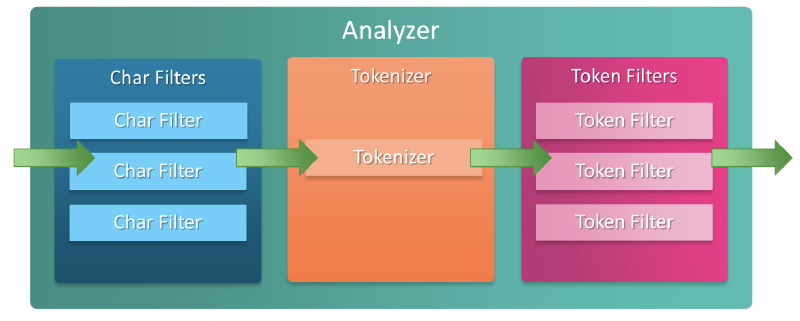
Token Filter#
Token Filter receives the token stream generated by the Tokenizer and performs the role of adding, removing, or modifying tokens.
Word Delimiter Graph Filter#
The word delimiter graph filter is designed to remove punctuation from complex identifiers like product IDs or part numbers. For these use cases, it is recommended to use it with the keyword tokenizer.
When separating hyphenated words like wi-fi, it’s better not to use the word delimiter graph filter. Since users search both with and without hyphens, it’s better to use the synonym graph filter.
Conversion Rules#
Tokens are split in the following ways:
- Split tokens at non-alphanumeric characters:
Super-Duper→Super, Duper - Remove leading and trailing delimiters:
XL---42+'Autocoder'→XL, 42, Autocoder - Split at case transitions:
PowerShot→Power, Shot - Split at letter-number transitions:
XL500→XL, 500 - Remove English possessives:
Neil's→Neil
API Usage Example#
GET /_analyze
{
  "tokenizer": "keyword",
  "filter": ["word_delimiter_graph"],
  "text": "Neil's-Super-Duper-XL500--42+AutoCoder"
}
// Result -> [ Neil, Super, Duper, XL, 500, 42, Auto, Coder ]
Custom Analyzer Configuration#
PUT /my-index-000001
{
  "settings": {
    "analysis": {
      "analyzer": {
        "my_analyzer": {
          "tokenizer": "keyword",
          "filter": ["word_delimiter_graph"]
        }
      }
    }
  }
}
Configurable Parameters#
adjust_offsets#
- Default:
true - When true, the filter adjusts the starting point of split tokens or catenated tokens to better reflect their actual position in the token stream
- If using filters like trim that change token length without changing offset, this should be set to
falsewhen used together
catenate_all#
- Default:
false - When true, the filter generates catenated tokens for alphanumeric chains separated by non-alphanumeric delimiters
- Example:
super-duper-xl-500→[ superduperxl500, super, duper, xl, 500 ]
catenate_numbers#
- Default:
false - When true, the filter generates catenated tokens for numeric character chains separated by non-alphabetic delimiters
- Example:
01-02-03→[ 010203, 01, 02, 03 ]
catenate_words#
- Default:
false - When true, the filter generates catenated tokens for alphabetic character chains separated by non-alphabetic delimiters
- Example:
super-duper-xl→[ superduperxl, super, duper, xl ]
⚠️ Caution when using Catenate parameters
Setting these parameters to true generates multi-position tokens that are not supported in indexing
If these parameters are true, either don’t use this filter in the index analyzer or use the flatten_graph filter after this filter to make the token stream suitable for indexing
When used in search analysis, catenated tokens can cause issues with match_phrase queries and other queries that rely on matching token positions. If you plan to use these queries, you should not set these parameters to true.
generate_number_parts#
- Default:
true - When true, the filter includes tokens composed of numbers in the output
- When false, the filter excludes these tokens from the output
generate_word_parts#
- Default:
true - When true, the filter includes tokens composed of alphabetic characters in the output
- When false, excludes these tokens from the output
ignore_keywords#
- Default:
false - When true, the filter skips tokens with the keyword attribute set to true
preserve_original#
- Default:
false - When true, the filter includes the original version of split tokens in the output
- This original version includes non-alphanumeric delimiters
- Example:
super-duper-xl-500→[ super-duper-xl-500, super, duper, xl, 500 ]
⚠️ Caution when using preserve_original parameter
Setting this parameter to true generates multi-position tokens that are not supported in indexing
If this parameter is true, either don’t use this filter in the index analyzer or use the flatten_graph filter after this filter to make the token stream suitable for indexing
protected_words#
(Optional, array of strings)
- An array of tokens that the filter will not split
protected_words_path#
(Optional, string)
- Path to a file containing a list of tokens that the filter will not split
- This path must be an absolute or relative path to the config location, and the file must be UTF-8 encoded
- Each token in the file must be separated by a newline
split_on_case_change#
(Optional, Boolean)
- Default:
true - When true, the filter splits tokens at case transitions
- Example:
camelCase→[ camel, Case ]
split_on_numerics#
(Optional, Boolean)
- Default:
true - When true, the filter splits tokens at letter-number transitions
- Example:
j2se→[ j, 2, se ]
stem_english_possessive#
(Optional, Boolean)
- Default:
true - When true, the filter removes English possessives (’s) from the end of each token
- Example:
O'Neil's→[ O, Neil ]
type_table#
(Optional, array of strings)
- An array of custom type mappings for characters
- This allows mapping non-alphanumeric characters as numeric or alphanumeric to prevent splitting at those characters
Example
[ "+ => ALPHA", "- => ALPHA" ]
The above array maps plus (+) and hyphen (-) characters as alphanumeric, so they are not treated as delimiters.
Supported Types
ALPHA(Alphabetical)ALPHANUM(Alphanumeric)DIGIT(Numeric)LOWER(Lowercase alphabetical)SUBWORD_DELIM(Non-alphanumeric delimiter)UPPER(Uppercase alphabetical)
type_table_path#
(Optional, string)
- Path to a custom type mapping file
Example
# Map the $, %, '.', and ',' characters to DIGIT
# This might be useful for financial data.
$ => DIGIT
% => DIGIT
. => DIGIT
\u002C => DIGIT

# in some cases you might not want to split on ZWJ
# this also tests the case where we need a bigger byte[]
# see https://en.wikipedia.org/wiki/Zero-width_joiner
\u200D => ALPHANUM
This file path must be an absolute or relative path to the config location, and the file must be UTF-8 encoded. Each mapping in the file is separated by a newline.
Usage Cautions#
It’s not recommended to use the word_delimiter_graph filter with tokenizers that remove punctuation, such as the Standard tokenizer. This may prevent the word_delimiter_graph filter from splitting tokens correctly.
It may also interfere with the filter’s configurable parameters like catenate_all or preserve_original. Instead, it’s recommended to use the keyword or whitespace tokenizer.