

Tokenizer#
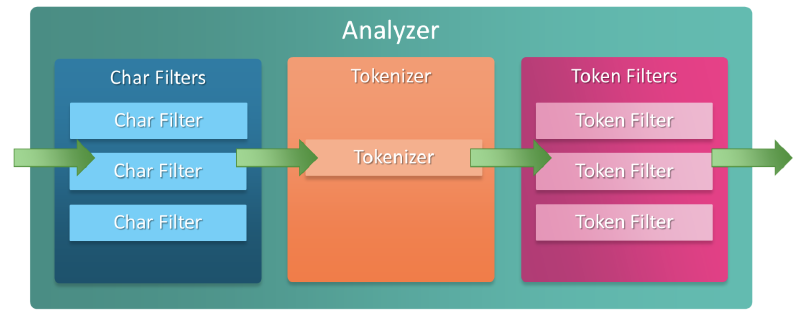
A Tokenizer receives a character stream and breaks it into individual tokens (usually tokenized by each word).
The most commonly used whitespace tokenizer splits and tokenizes based on whitespace.
Whitespace Tokenizer Example#
// character streams
Quick brown fox!

// Result
[Quick, brown, fox!]
Tokenizer’s Responsibilities#
- Ordering and position of each term (used in phrase or word proximity queries)
- Start and end characters of the original word before transformation are used for search snippet highlighting
- Token type:
<ALPHANUM>,<HANGUL>,<NUM>, etc. (simple analyzers only provide word token types)
Word Oriented Tokenizer#
The tokenizers below are used to tokenize full text into individual words.
Standard Tokenizer#
The standard tokenizer performs tokenization based on the Unicode Text Segmentation algorithm.
Configuration#
max_token_length: Splits and tokenizes at strings exceeding the specified length- Default = 255
Conversion Example#
POST _analyze
{
  "tokenizer": "standard",
  "text": "The 2 QUICK Brown-Foxes jumped over the lazy dog's bone."
}
// Result -> [ The, 2, QUICK, Brown, Foxes, jumped, over, the, lazy, dog's, bone ]
max_token_length Application Example#
PUT my-index-000001
{
  "settings": {
    "analysis": {
      "analyzer": {
        "my_analyzer": {
          "tokenizer": "my_tokenizer"
        }
      },
      "tokenizer": {
        "my_tokenizer": {
          "type": "standard",
          "max_token_length": 5
        }
      }
    }
  }
}

POST my-index-000001/_analyze
{
  "analyzer": "my_analyzer",
  "text": "The 2 QUICK Brown-Foxes jumped over the lazy dog's bone."
}
// Result -> [ The, 2, QUICK, Brown, Foxes, jumpe, d, over, the, lazy, dog's, bone ]
Letter Tokenizer#
The letter tokenizer splits and tokenizes at non-letter characters. This is suitable for European languages (English-speaking regions) but not for Asian languages, especially languages where words are not separated by spaces.
Conversion Example#
POST _analyze
{
  "tokenizer": "letter",
  "text": "The 2 QUICK Brown-Foxes jumped over the lazy dog's bone."
}
// Result -> [ The, QUICK, Brown, Foxes, jumped, over, the, lazy, dog, s, bone ]
Lowercase Tokenizer#
The lowercase tokenizer splits and tokenizes at non-letter characters like the letter tokenizer, and additionally converts all strings to lowercase. Functionally, it is efficient as it performs both the letter tokenizer’s function and lowercase conversion in one operation.
Conversion Example#
POST _analyze
{
  "tokenizer": "lowercase",
  "text": "The 2 QUICK Brown-Foxes jumped over the lazy dog's bone."
}
// Result -> [ the, quick, brown, foxes, jumped, over, the, lazy, dog, s, bone ]
Whitespace Tokenizer#
The whitespace tokenizer performs tokenization based on whitespace characters.
Configuration#
max_token_length: Splits and tokenizes at strings exceeding the specified length- Default = 255
Conversion Example#
POST _analyze
{
  "tokenizer": "whitespace",
  "text": "The 2 QUICK Brown-Foxes jumped over the lazy dog's bone."
}
// Result -> [ The, 2, QUICK, Brown-Foxes, jumped, over, the, lazy, dog's, bone. ]
UAX URL Email Tokenizer#
The uax_url_email tokenizer is identical to the standard tokenizer, but with one difference: it recognizes URLs or email addresses and treats them as a single token.
Configuration#
max_token_length: Splits and tokenizes at strings exceeding the specified length- Default = 255
Conversion Example#
POST _analyze
{
  "tokenizer": "uax_url_email",
  "text": "Email me at john.smith@global-international.com"
}
// Result -> [ Email, me, at, john.smith@global-international.com ]

// If using standard tokenizer for the above example, the result would be:
// Result -> [ Email, me, at, john.smith, global, international.com ]
Configuration Example#
PUT my-index-000001
{
  "settings": {
    "analysis": {
      "analyzer": {
        "my_analyzer": {
          "tokenizer": "my_tokenizer"
        }
      },
      "tokenizer": {
        "my_tokenizer": {
          "type": "uax_url_email",
          "max_token_length": 5
        }
      }
    }
  }
}

POST my-index-000001/_analyze
{
  "analyzer": "my_analyzer",
  "text": "john.smith@global-international.com"
}
// Result (ignores email format, max_token_length takes priority)
// [ john, smith, globa, l, inter, natio, nal.c, om ]
Classic Tokenizer#
The classic tokenizer performs grammar-based tokenization and is good for English documents. This tokenization method has special handling for abbreviations, company names, email addresses, and internet hostnames. However, these rules don’t always work and don’t work well for languages other than English.
Tokenizing Rules#
- Splits words at most punctuation marks, removing the punctuation. However, dots not followed by whitespace are considered part of the token.
- Splits words at hyphens, but if the word contains a hyphen, it recognizes it as a product number and doesn’t split it (e.g., 123-23).
- Email and internet hostnames are considered as a single token.
Configuration#
max_token_length: Splits and tokenizes at strings exceeding the specified length- Default = 255
Conversion Example#
POST _analyze
{
  "tokenizer": "classic",
  "text": "The 2 QUICK Brown-Foxes jumped over the lazy dog's bone."
}
// Result -> [ The, 2, QUICK, Brown, Foxes, jumped, over, the, lazy, dog's, bone ]
Thai Tokenizer#
The thai tokenizer tokenizes Thai text into words. It uses the Thai segmentation algorithm included in Java. If the input text contains strings in languages other than Thai, the standard tokenizer is applied to those strings.
⚠️ Warning: This tokenization method may not be supported in some JREs. This tokenization method is known to work with Sun/Oracle and OpenJDK. If considering full portability for your application, it’s recommended to use the ICU tokenizer instead
Conversion Example#
POST _analyze
{
  "tokenizer": "thai",
  "text": "การที่ได้ต้องแสดงว่างานดี"
}
// Result -> [ การ, ที่, ได้, ต้อง, แสดง, ว่า, งาน, ดี ]