

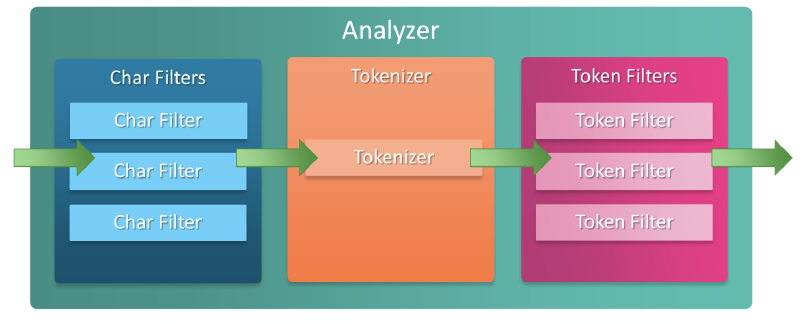
Character Filters#
Character Filter is a process that preprocesses the input string before the tokenizer stage.
It adds, removes, or replaces characters in strings.
Elasticsearch provides the following basic Character Filters and also allows custom filters.
HTML Strip Character Filter#
Converts HTML-formatted input values into decoded values.
Conversion Example#
GET /_analyze
{
"tokenizer": "keyword",
"char_filter": ["html_strip"],
"text": "<p>I'm so <b>happy</b>!</p>"
}
// Result -> [ \nI'm so happy!\n ]
Application Method#
PUT /my-index-000001
{
  "settings": {
    "analysis": {
      "analyzer": {
        "my_analyzer": {
          "tokenizer": "keyword",
          "char_filter": ["html_strip"]
        }
      }
    }
  }
}
Mapping Character Filter#
The Mapping Character Filter converts the input string to the corresponding key’s value when it matches a character specified as a key.
The matching method is greedy, converting to the most matched pattern, and the replacement value can be an empty string.
Conversion Example#
GET /_analyze
{
  "tokenizer": "keyword",
  "char_filter": [
    {
      "type": "mapping",
      "mappings": [
        "٠ => 0",
        "١ => 1",
        "٢ => 2",
        "٣ => 3",
        "٤ => 4",
        "٥ => 5",
        "٦ => 6",
        "٧ => 7",
        "٨ => 8",
        "٩ => 9"
      ]
    }
  ],
  "text": "My license plate is ٢٥٠١٥"
}
// Result -> [ My license plate is 25015 ]
Pattern Replace Character Filter#
The pattern_replace filter converts strings matching a regular expression to a specified string.
⚠️ Warning: Regular expressions follow Java regex, and poorly written regex can cause performance degradation or StackOverflow errors, and may suddenly terminate running nodes.
Parameters#
pattern: Java regular expressionreplacement: String to replace withflags: Java regular expression flags, separated by|(e.g., “CASE_INSENSITIVE|COMMENTS”)
Conversion Example#
PUT my-index-000001
{
  "settings": {
    "analysis": {
      "analyzer": {
        "my_analyzer": {
          "tokenizer": "standard",
          "char_filter": ["my_char_filter"]
        }
      },
      "char_filter": {
        "my_char_filter": {
          "type": "pattern_replace",
          "pattern": "(\\d+)-(?=\\d)",
          "replacement": "$1_"
        }
      }
    }
  }
}

POST my-index-000001/_analyze
{
  "analyzer": "my_analyzer",
  "text": "My credit card is 123-456-789"
}
// Result -> [ My, credit, card, is, 123_456_789 ]