

Clustering#
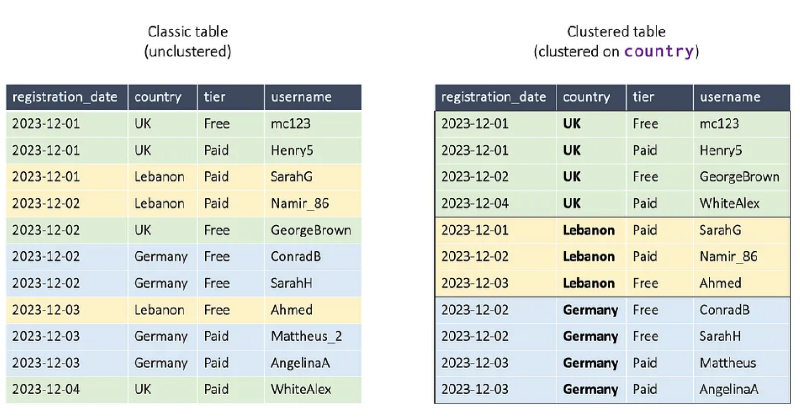
SELECT *
FROM user_signups
WHERE
  country = 'Lebanon'
  AND registration_date = '2023-12-01'
Through clustering, BigQuery can perform less work in accessing data, thereby increasing query speed. However, before clustering, it’s good to consider the amount of data in the table and whether the cost of processing clustering might be worse.
For example, if a BigQuery column-based table has only 10 rows of data, you should recognize that the cost of clustering will be higher than the cost of doing a full scan.
Quoting a former Google engineer, if the data group for clustering is less than 100MB, doing a full scan might be better than clustering.
Reference: Google BigQuery clustered table not reducing query size
Important Note
Additionally, if you don’t filter on the clustered base column during query time, it provides no help to query performance whatsoever.
Example of Creating Clustered Tables#
CREATE TABLE `myproject.mydataset.clustered_table` (
  registration_date DATE,
  country STRING,
  tier STRING,
  username STRING
) CLUSTER BY country;
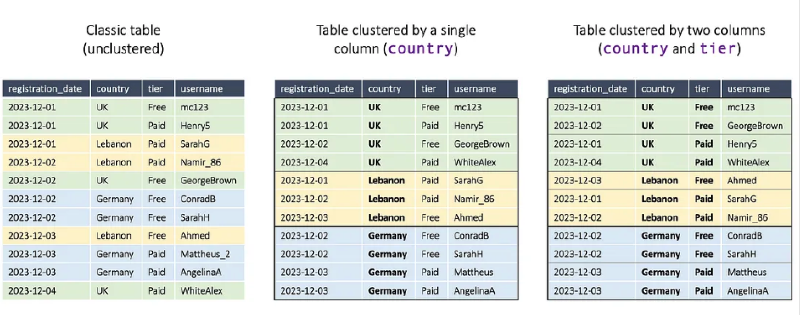
Clustering Features
- Can cluster up to 4 columns maximum
- Unlike partitioning, not limited to INT64 and DATE types only
- Can also use types like STRING and GEOGRAPHY
Combine Clustering with Partitioning#
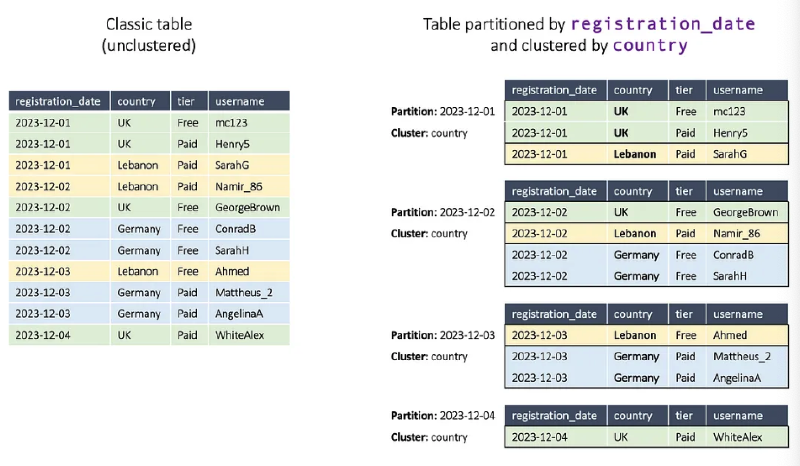
Using partitioning and clustering together enables more efficient data access.
Combination Strategy
- Partitioning: Date-based data division
- Clustering: Additional sorting within partitions
- Query performance and cost optimization