🐳 What is Docker?
Docker’s core concepts are broadly divided into two: Container and Image
Docker Image
Real-World Example
If you were to install Jenkins on Linux using the traditional method:
$ sudo apt-get install jenkins
Running this command requires downloading multiple dependency packages together.
However, using Docker:
$ docker pull jenkins/jenkins:lts
You can download a pre-configured image containing all necessary components at once.
📦 Docker Registry & Docker Hub
Docker Hub is the official Docker registry, providing official images from vendors.
Workflow
- Users download images from the registry
- Run images as containers
- Configure multiple isolated environments on a single computer
🔄 Container Virtualization
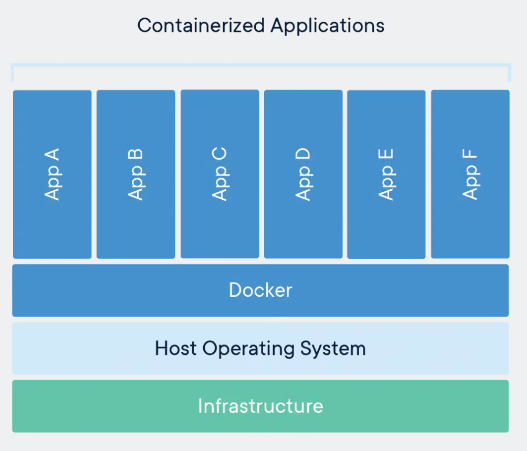
Important Note: Containers are not exclusive to Docker. Various container technologies exist, including OpenVZ, Libvirt, and LXC.
🖥️ Types of Virtualization
1. Host Virtualization
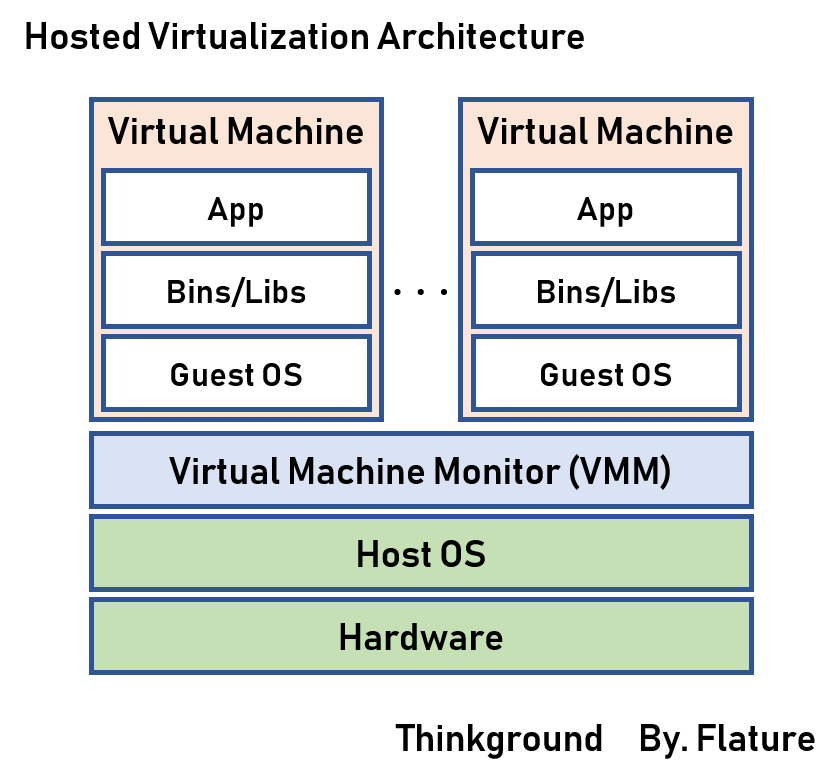
Structure: Guest OS runs on top of Host OS through virtualization software.
- Examples: VM Workstation, VMware Player, VirtualBox, etc.
Advantages:
- Simple installation and configuration
- Minimal host requirements through hardware emulation
Disadvantages:
- Resource-intensive due to running OS on top of OS
- Significant performance overhead
2. Hypervisor Virtualization
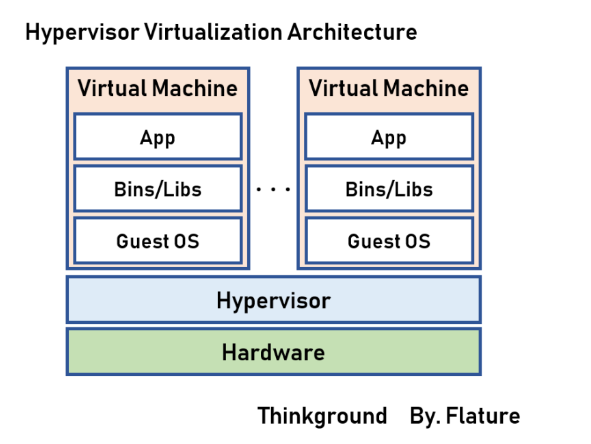
Structure: Software is installed and runs directly on hardware without a Host OS.
Two Approaches to Hypervisor Virtualization:
1) Full Virtualization
- Guest OS accesses hardware through the hypervisor, not directly
- More stable but has performance overhead
2) Paravirtualization
- Guest OS directly accesses hardware through the hypervisor
- Faster but requires OS modifications
Advantages:
- More efficient without Host OS
- Better resource utilization
Disadvantages:
- Slow startup time
- Still consumes significant resources as each VM runs an independent OS
3. Container Virtualization ⭐
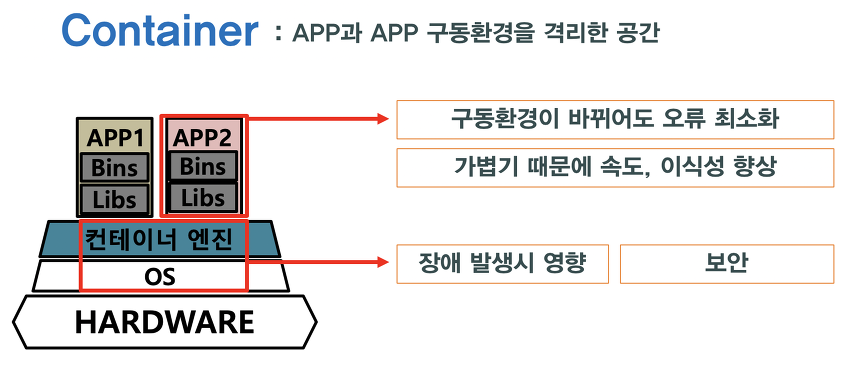
Structure: Applications share the host OS kernel while maintaining isolated environments.
Advantages:
- Lightweight: Typically tens of MB (VMs are tens of GB)
- Fast startup: No need to boot a separate OS
- Low resource usage: Efficient utilization of system resources
- High density: Run more containers on the same hardware
Disadvantages:
- Requires the same OS environment as the host system
- Cross-platform deployment can be challenging (e.g., Linux containers require Linux host)
📊 Virtualization Comparison
| Category | Host Virtualization | Hypervisor Virtualization | Container Virtualization |
|---|---|---|---|
| Size | Tens of GB | Tens of GB | Tens of MB |
| Startup Speed | Slow | Slow | Very Fast |
| Resource Usage | High | Medium | Low |
| Isolation Level | High | High | Medium |
| Portability | Low | Medium | High |
| Setup Difficulty | Easy | Hard | Medium |
💡 Summary
Core Value of Docker Container Virtualization:
- Efficiency: Provides the same functionality with far fewer resources than traditional virtualization
- Speed: Start and stop applications in seconds
- Consistency: Runs identically across development, testing, and production environments
- Scalability: Easy to add or remove containers as needed
Docker is a core tool for modern application development and deployment, serving as the foundation for DevOps and microservices architecture.